Rare — Everwild inventory UI and spatial navigation

For Rare's Everwild, I worked as a UI software engineer building out the inventory HUD. I built a bespoke spatial navigation system for gamepad, keyboard, and mouse, backed by a debug visualiser.
The Challenge
The inventory HUD was a core part of the game interface. It had to be intuitive to use across gamepad, keyboard, and mouse, and stay flexible enough to support ongoing design changes.
Players needed to:
- navigate the screen with a gamepad, keyboard, or mouse
- browse and filter their inventory
- interact with and select items
The Stack
The UI was built with web technologies running inside Unreal Engine via Coherent Gameface, allowing the team to use a modern frontend workflow.
- TypeScript for application logic, data modelling, and interaction systems
- SolidJS for reactive UI components
- Vite for local development and build tooling
- CSS/Sass for layout, animation, and visual implementation
- Coherent Gameface as the bridge between web UI and Unreal Engine
The Solution
I worked closely with designers to turn Figma concepts into interactive UI, using designer feedback and playtesting sessions to refine layout, interaction states, and navigation behaviour. This was especially important because controller navigation often exposes edge cases that aren't obvious in static design files.
I also collaborated with engine team to define data contracts between the UI and Unreal Engine. This involved working with Unreal Blueprints and matching the frontend data model to engine-side expectations.
Spatial Navigation
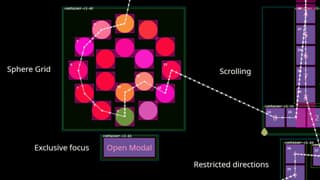
The spatial navigation system was the most technically substantial part of the project.
Unlike a conventional grid-based UI, the system had to support directional movement across layouts that weren't simple grids. Items, filters, categories, and contextual controls could be arranged in creative ways, and those layouts would keep evolving as the design developed.
I researched existing approaches to spatial navigation, including:
- the BBC's LRUD-Spatial library
- Spotify's article on TV Spatial Navigation
- Ryosuke Hana's article on spatial navigation in React
From this research, I designed the navigation system around three composable concepts: focus history, focus groups, and element selection.
Focus architecture
The focus stack maintained a history of focused UI elements, allowing navigation both forwards and backwards. For example, a player might move through Inventory → Section → Category → Item, with each step pushed onto the stack and unwound when the player pressed Back.
It also had to handle priority interruptions: if a modal confirmation appeared, focus moved to it immediately, then returned to the previously focused element once the modal was dismissed.
On top of basic movement, groups and elements supported several behaviours:
- Looping: reaching the edge of a group wraps focus back to the start of that row or column
- Capturing: focus can be restricted to a single group, ignoring other focusable elements on screen. This is what a modal needs — focus stays inside it until it's dismissed
- Restricted directions: an element can accept movement from only chosen directions, so focus never escapes a control in a way that would feel wrong to the player
- Scrollable regions: moving focus through a scrolling container drives its scroll position, bringing off-screen items into view as the player reaches them
- Focus callbacks: elements emit
onFocusandonBlurevents carrying their id and data, giving game logic a clean hook into whatever the player currently has selected
This gave predictable controller navigation while still supporting mouse interactions.
Non-grid navigation
Standard grid layouts make it straightforward to infer which element sits above, below, left, or right of the current focus. Arbitrary non-grid layouts needed a different approach.
My solution used a tree search to filter sibling elements, then calculated the distance from each of these potential targets to the currently focused element. The system selected the nearest valid element in the direction of travel.
This gave designers the freedom to build expressive, non-grid layouts while keeping directional navigation predictable for players.
Making navigation visible with a debugging visualiser
As the nearest-element selection logic grew more complex, reasoning about it through code alone became increasingly difficult. The next item to select could depend on element position, which group it was in, focus history, and more.
To make the navigation behaviour visible, I built a debugging visualiser that drew over the live game UI. It was marked as non-interactive, so gamepad, keyboard, and pointer input passed straight through to the UI underneath.
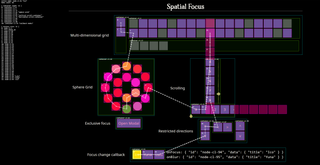
Note: The screenshot is of a development demo and contains no project UI
The overlay rendered a live view of the navigation system's internal state, drawing:
- bounding boxes around selectable elements and their parent focus groups
- the current focus state and a visual history stack showing the exact path taken
- real-time metrics in a side panel, including active nodes, container counts, and history size
This turned an invisible, abstract system into something we could see and point at. Designers could understand why focus landed on a particular element, engineers could verify edge cases quickly, and the whole team could discuss unexpected behaviour against the same picture.
It was especially useful for non-grid layouts, where the 'correct' next element was often a design decision rather than a purely logical one.
Technical Contributions
- Spatial navigation: Designed and implemented a bespoke directional navigation system with focus stacks, element groups, looping and capture, scrollable regions, focus callbacks, and support for non-grid layouts
- Debugging tooling: Built a visualisation overlay for inspecting focus state, history, and navigation paths in real time
- UI development: Built inventory HUD screens and components in TypeScript and SolidJS
- Data contract: Defined TypeScript models for communication between the UI and the Unreal Engine
- Visual styling: Implemented UI designs using CSS and Sass
The work is an example of the UI engineering I enjoy: building polished interfaces, solving complex interaction problems, and creating tools that help multidisciplinary teams.